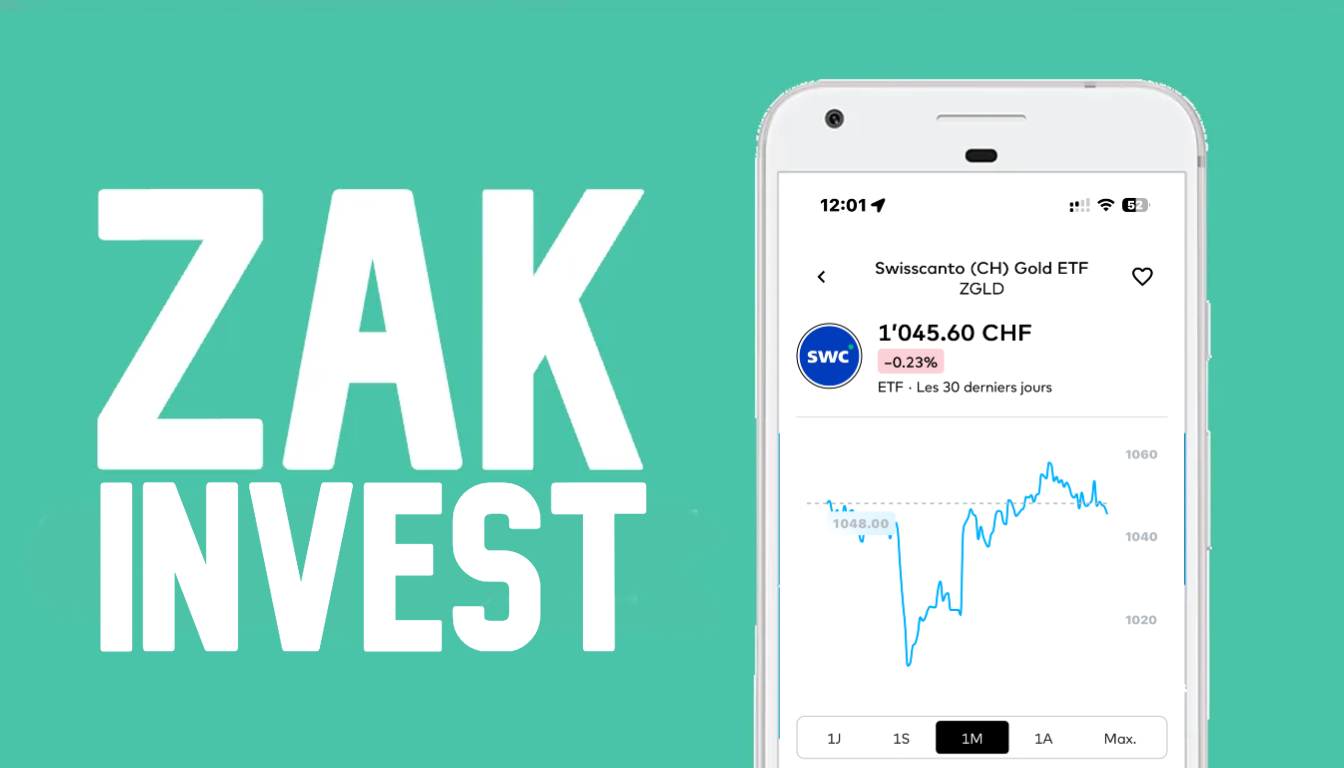
With the launch of Zak Invest, you can now invest in stocks, ETFs and funds directly from the Zak app. The feature is built into the app and lets you buy securities without using an external platform.
In this article, we show you how Zak Invest works in practice: where to find the feature in the app, what you can invest in, how a purchase works, and what fees apply. The content is based on hands-on use, with screenshots from the app.
You’ll also find, section by section, comments and key points to watch, including what Zak Invest can do today, as well as some limitations you should know before investing.
Zak Invest at a glance
Before getting into the details, here are the key facts to know about Zak Invest, as they appear in the app and in the information provided by Zak / Banque Cler.
| Bank | Management fees | Funds | Number of accounts | Sustainability | Specific features |
|---|---|---|---|---|---|
| Alpian 3a | 0% (until 31.12.2026), then 0.60% | BlackRock | 1 | Not mandatory | Premium offer, FINMA license, CHF 1,000 minimum |
| Neon 3a | 0.39–0.45% | Swisscanto | Up to 5 | Optional | Launching end of November, integrated into the Neon app |
| Yuh 3a | 0.50% | Swisscanto Sustainable | 1 | Yes | Simple, sustainable, minimal customization |
| Zak 3a | 0.45% | Swisscanto Responsible | 1 | Yes | Classic and stable, via Banque Cler |
Where to find Zak Invest in the Zak app?
Zak Invest is accessible directly in the Zak app, with no additional installation and no external sign-up. You can access it in two ways.
The first is via the Zak Store. In this section of the app, Zak Invest appears as a feature to activate. Opening the securities account is done directly in the app in a few steps, with validation of the required documents.
The second is via the Invest tab, visible in the main navigation once the feature is activated. From this tab you can search for securities, browse lists of stocks, ETFs and funds, and place orders.
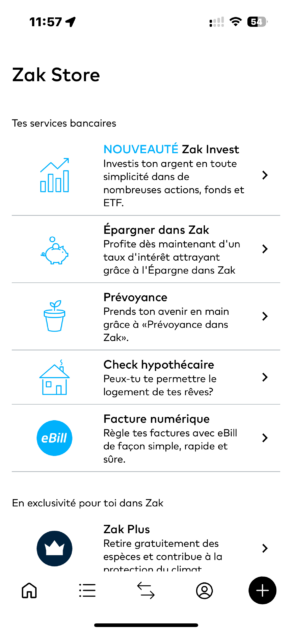
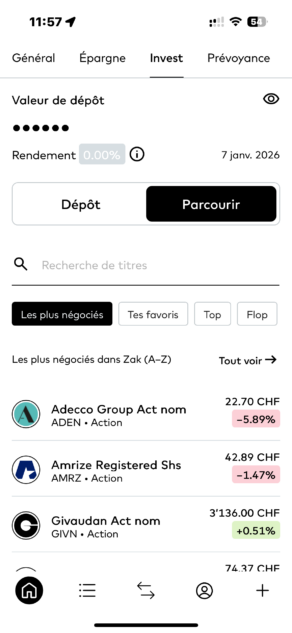
Access to Zak Invest is simple and consistent with the rest of the Zak app. Everything happens in one place, with no redirection to an external platform. In practice, this makes it easier to keep an overview of your account and your investments.
That said, until the feature is activated, Zak Invest can easily go unnoticed. If you don’t regularly check the Zak Store or the Invest tab, you might not see it right away.
What can you invest in with Zak Invest?
With Zak Invest, you can invest in stocks, ETFs and funds directly from the Zak app. Products are available via dedicated categories or through the search function.
Stocks include Swiss and international companies. You buy the securities directly, without using an external intermediary, and positions then appear in your Zak Invest portfolio.
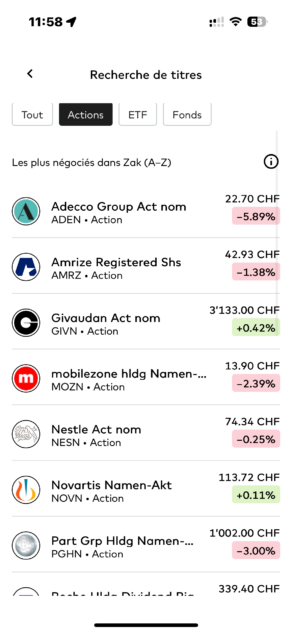
ETFs let you invest more broadly—for example in indices, sectors or regions. Here too, selection happens directly in the app, with a product sheet for each ETF.
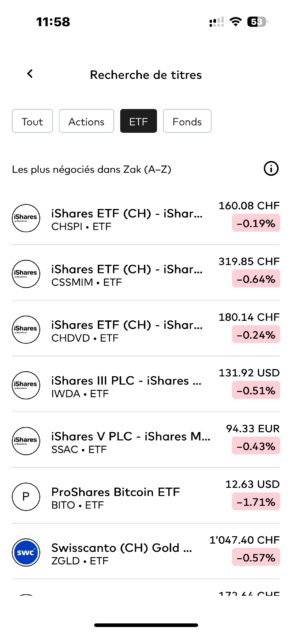
Finally, Zak Invest gives access to investment funds, mainly managed by Swiss and international providers. These funds are accessible with no specific minimum amount other than what is implied by the fund’s price.
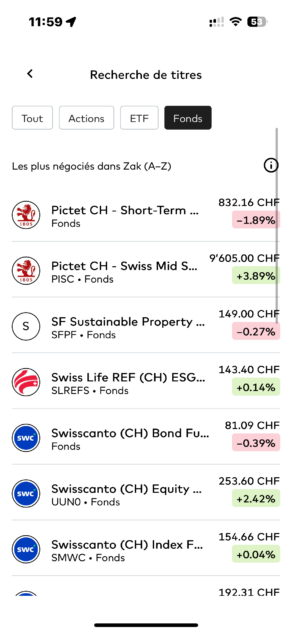
In practice, Zak Invest covers the three main product categories expected for classic investing. This makes it possible to build a simple portfolio—either with a few individual stocks or with more diversified ETFs and funds.
Which exchanges do you invest on?
When you invest with Zak Invest, the exchange depends on the security you select. This information appears directly on the product page and when placing an order.
📊 Available exchanges
According to the Zak Invest brochure, securities can be traded on the main global exchanges, including:
- SIX Swiss Exchange
- NASDAQ
- NYSE
- XETRA
- London Stock Exchange (LSE)
- Hong Kong Stock Exchange (SEHK)
In the app, the listing venue and the currency are always shown before you confirm the order. So you clearly see where the security is traded and in which currency the purchase will be executed.
In practice, this approach simplifies things a lot. You don’t need to worry about technical market details or symbols: you select a security, and Zak Invest shows you where it’s traded and in which currency.
On the other hand, you don’t get an overview of all available exchanges upfront. The logic is driven by the product you’re looking for, not by the market itself. For most investors, that’s enough, but more advanced users may find this somewhat restrictive.
👉 Key takeaway
You choose a security, and Zak Invest automatically shows the exchange and the related currency. Market access is product-driven, with no manual selection of exchanges.
What do the security pages look like?
When you select a stock, ETF or fund in Zak Invest, you land on a security page that brings together the main information you need before investing.
On these pages, you’ll typically find:
- the current price of the security
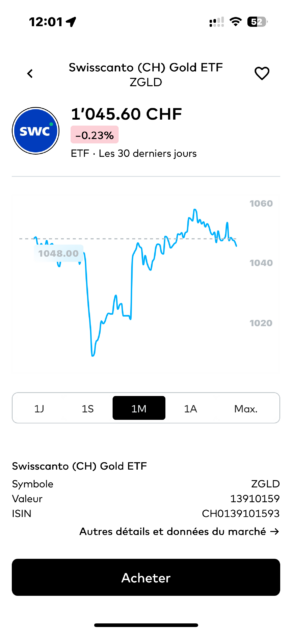
- price evolution shown as a chart (1 day, 1 week, 1 month, 1 year, max.)
- the percentage change
- basic details such as the ISIN, symbol and currency
- information and ratings provided by Banque Cler
- performance indicators, plus “Top” and “Flop” lists depending on the selected period
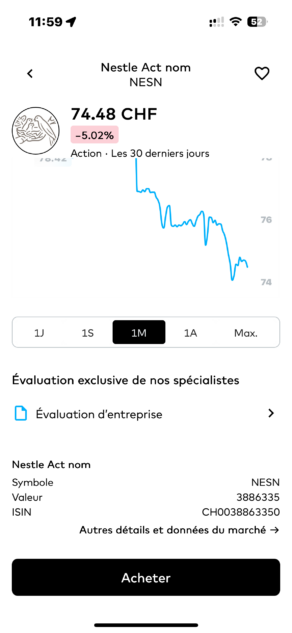
All of this information is available directly in the app, without needing to open an external site.
The security pages focus on the essentials. You quickly get a sense of how the security has moved and you have the basic information required to place an order. For a straightforward decision, it’s sufficient and well integrated into the app.
However, if you’re used to doing deeper analysis of companies or ETFs, you’ll likely want to use additional external sources. Zak Invest isn’t meant to replace advanced analysis tools—it’s designed to let you invest quickly with key information at hand.
👉 Key takeaway
Security pages are designed to be straight to the point. They’re enough for simple investing, but they don’t replace more comprehensive analysis tools.
How to buy a stock, ETF or fund with Zak Invest
Buying a security with Zak Invest is done directly in the app in just a few steps. The journey is the same whether you buy a stock, an ETF or a fund.
You start by searching for a security or selecting it from the available categories.
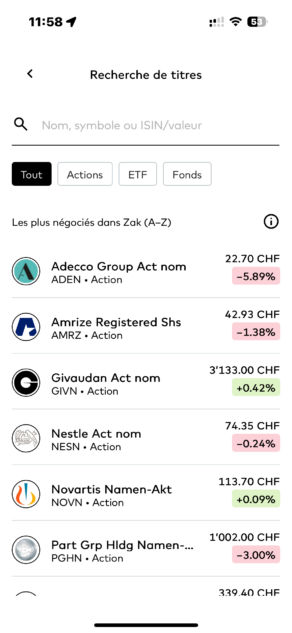
Once on the product page, you can start the purchase.
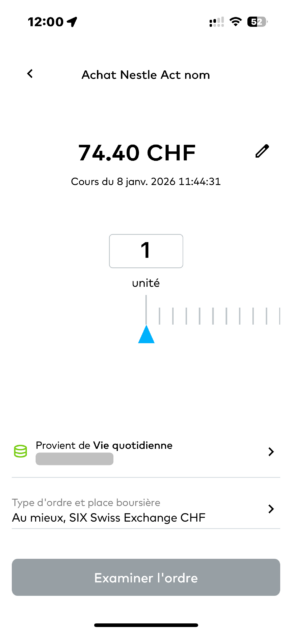
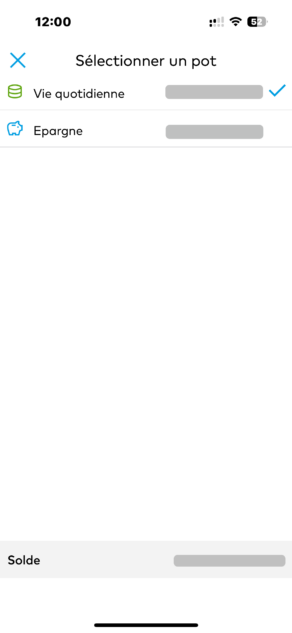
Before confirming your order, you must:
- choose the account to use (Everyday life pot or Savings)
- check the listing venue and the currency
- select the order type (best price or limit)
- enter the number of units or the amount to invest (depending on the product)
A summary is then displayed with the total amount, the fees applied, and the order details. Confirmation happens directly in the app.
The buying flow is clear and quick. Screens focus on what matters, and fees are visible before you confirm, which helps avoid surprises. For an occasional purchase, it’s easy to get started.
Note, however, that for stocks and ETFs, you must buy whole units. If the security price is high, this can limit how much you can invest or force you to allocate a larger amount than planned. It’s worth keeping in mind before placing your first order.
👉 Key takeaway
Buying a security with Zak Invest is simple and quick, but the lack of fractional shares can be a constraint depending on the amounts you invest.
What order types can you use?
With Zak Invest, you can place two types of orders: a best price order and a limit order. The choice is made directly when buying, before confirmation.
⚡ Best price order (Order at best)
A best price order lets you buy or sell a security at the best available market price at the time of execution. It’s the simplest option: you enter the number of units or the amount, and the order is executed as soon as the market is open.
🎯 Limit order
A limit order lets you set a maximum price you are willing to pay when buying (or a minimum price when selling). The order is executed only if the market reaches that price.
Orders placed outside market hours are recorded and executed when the relevant exchange opens.
These two order types cover the basics for typical use. A best price order works well if you want to invest quickly without trying to optimize to the last cent. A limit order is useful if you want tighter control over your entry price.
However, you won’t find more advanced order types (stop, stop-limit, etc.). Zak Invest focuses on simplicity and is aimed primarily at investors who prefer ease of use rather than active trading.
👉 Key takeaway
Zak Invest offers only basic order types. It’s sufficient for simple investing, but not suited to advanced trading strategies.
How much does it cost to invest with Zak Invest?
Before confirming an order, Zak Invest always displays the fees applied. So you know exactly how much the transaction will cost before you confirm.
💰 Zak Invest fees
| Criteria | Alpian | Neon | Yuh | Zak |
|---|---|---|---|---|
| Annual fees | 0.60% per year (0% until December 31, 2026 for the first 1,000) | 0.39% – 0.45% depending on the amount | 0.50% all inclusive | TER ≈ 1.25% per annum for the securities option |
| Percentage of shares (max) | ~ According to BlackRock strategy | ~97% | ~97% | ~ According to Swisscanto profile |
| Management within the app | Yes | Yes | Yes | Yes |
| Multiple 3a accounts | ❌ (1 account) | ✔️ (up to 5 accounts) | ❌ (1 account) | ❌ (1 account) |
| Transfer possible | ✔️ | ✔️ | ✔️ | ✔️ |
| Opening a 3a account | In the Alpian app | In the Neon app | In the Yuh app | In the Zak app |
Fees are always visible in the summary before confirmation, helping you avoid surprises. Fee caps on certain operations also provide clarity as invested amounts increase.
However, if you invest small amounts, minimum fees can weigh relatively heavily on each transaction. In that case, it can be more efficient to bundle investments rather than placing many small orders.
👉 Key takeaway
The fee structure is clear and transparent, but minimums can penalize small amounts. Zak Invest is better suited to occasional or bundled investing.
What you should know before investing
Before using Zak Invest, it’s important to understand the framework you’re investing in. The feature is intentionally simple, and certain rules directly affect how you can use it.
For stocks, you can only buy whole units. If you invest small amounts or want to spread purchases across high-priced stocks, this can quickly become a constraint.
Zak Invest can be used as a secondary securities account within the Zak / Banque Cler ecosystem. Transferring existing securities is possible, but the details depend on the type of securities and your individual situation. To understand the process that applies to you, it’s recommended to contact Zak / Banque Cler support.
You should also know that automatic investment plans are not available. Each order must be placed manually, which requires more follow-up if you invest regularly.
Finally, Zak Invest does not allow you to buy cryptocurrencies directly. Exposure to this type of asset is only possible via ETFs.
👉 Key takeaway
Zak Invest is designed for simple, occasional investing. If you want to automate investing, invest very small amounts, or centralize an existing portfolio, these points should be considered from the start.
Security and banking framework
With Zak Invest, your investments are held within a Swiss banking framework. The securities account is held with Banque Cler, the bank behind Zak. Your securities are therefore not held by an external platform, but within a regulated banking environment.
When opening the securities account, you accept the required regulatory documents directly in the app, including those related to financial instrument risks and custody conditions. These documents remain accessible in the app.
If you have questions, Zak support remains your primary point of contact. You can get help through Zak’s usual channels and, if needed, through Banque Cler branches.
The framework is clear and reassuring, especially if you’re already a Zak customer. You stay within a familiar banking environment under Swiss supervision.
That said, as with any integrated banking solution, support remains generalist. Zak Invest does not provide personalized advice: investment decisions remain entirely your responsibility.
👉 Key takeaway
Zak Invest relies on Banque Cler’s Swiss banking framework. Zak Invest itself is offered on an execution-only basis, with no personalized guidance on investment choices, regardless of any advisory services Banque Cler may offer separately.
Who Zak Invest may be suitable for in 2026
Zak Invest may suit you if you’re looking for a simple way to invest, directly from your banking app, without juggling multiple tools or accounts.
It is particularly suitable if you are already a Zak customer and want to start investing or complement existing investments without using an external platform. The flow is clear, fees are shown before each order, and the overall experience is easy to use.
Zak Invest can also make sense if you invest occasionally, for example to buy a few stocks, ETFs or funds, without automating your strategy or using advanced tools.
However, if you invest regularly in small amounts, want to automate purchases, or manage a more complex portfolio, some of the limitations mentioned above may quickly matter.
👉 Key takeaway
Zak Invest is suitable for simple investing integrated into your bank account. It mainly fits profiles that prioritize simplicity over a more structured or automated approach.
Conclusion
Zak Invest lets you invest in stocks, ETFs and funds directly from the Zak app, without using an external platform. The feature focuses on essentials: access to main products, a clear buying flow, and fees displayed before each order.
In practice, Zak Invest is best if you want a simple, integrated solution to invest occasionally or complement your investments while staying within a Swiss banking framework. It’s coherent, easy to use, and transparent enough to understand what you’re doing.
That said, some limitations are important to know upfront: no fractional shares and no automatic investment plans. Depending on how you invest, these may be minor… or decisive.
Overall, Zak Invest does what it claims: it enables you to invest from your banking app without unnecessary complexity. It’s up to you to decide whether this format matches your habits and investment goals.
Frequently asked questions (FAQ) about Zak Invest
✅ What is Zak Invest?
Zak Invest is the investment feature built into the Zak app. It allows you to invest in stocks, ETFs and funds directly from the app, without using an external platform.
✅ Which products can you invest in with Zak Invest?
With Zak Invest, you can invest in stocks, ETFs and funds. Products are available directly in the app via dedicated categories or the search function.
✅ Can you invest any amount with Zak Invest?
That depends on the product. For funds, you can invest any amount. However, for stocks, you can only buy whole shares. Fractional shares are not available.
✅ Is it possible to buy or sell cryptocurrencies with Zak Invest?
No. Zak Invest does not allow you to buy or sell cryptocurrencies directly. Exposure to cryptocurrencies is only possible via ETFs that track cryptocurrencies.
✅ Can you transfer an existing portfolio to Zak Invest?
Yes. Transferring a securities account is possible. The details depend on your situation and the type of securities involved. To understand the process for your case, it’s recommended to contact Zak / Banque Cler support directly.
✅ Does Zak Invest offer automatic investment plans?
No. Automatic investment plans are not available with Zak Invest. Each investment must be made manually.
✅ Do stocks purchased with Zak Invest allow registration in the shareholders’ register?
Yes, on request. When buying stocks with Zak Invest, registration in the shareholders’ register is not automatic.
However, Banque Cler offers direct and free registration in the Swiss shareholders’ register. The details should be confirmed with Zak / Banque Cler support.
✅ Which exchanges can you invest on with Zak Invest?
According to Zak Invest documentation, securities can be traded on major global exchanges, including the SIX Swiss Exchange, NASDAQ, NYSE, XETRA, the London Stock Exchange (LSE) and the Hong Kong Stock Exchange (SEHK).
✅ Which order types are available with Zak Invest?
Zak Invest offers two order types: a best price order and a limit order. More advanced orders, such as stop or stop-limit orders, are not available.
✅ What are the fees with Zak Invest?
Zak Invest applies brokerage fees, annual custody fees, and, where applicable, external fees such as stamp duty or exchange fees. The exact fees are always displayed before you confirm an order.
✅ Do Zak Plus customers get benefits on Zak Invest?
Yes. Zak Plus customers benefit from a 50% discount on brokerage fees applied to their transactions.
✅ Are investments with Zak Invest secure?
Yes. The securities account is held with Banque Cler, within a regulated Swiss banking framework. Securities are not held by an external platform.
✅ Does Zak Invest provide personalized investment advice?
No. Zak Invest does not provide personalized advice. Investment decisions are made by the user, with no individualized recommendations.
✅ Is a tax statement (e-tax statement) available with Zak Invest?
Yes. An electronic tax statement (e-tax statement) can be ordered on request. This service is paid, with fees starting at CHF 75.

As the founder of Neo-banques.ch, Philippe uses several Swiss and European online banks on a daily basis, including Yuh, Alpian, N26, Wise, and Revolut for his personal and professional transactions.
He has also previously used Neon and Zak as primary accounts before migrating to other solutions.